User Guide
Who PSI/J Is for
PSI/J is a Python library for submitting and managing HPC jobs via arbitrary Resource Managers (RMs). PSI/J abstracts the specific RM, making your code RM-independent and portable, or at least easier to port, across HPC centers. If you want your project to be able to request resources from one or more of Slurm, LSF, Flux, Cobalt, PBS, and your local machine, we think you will find that PSI/J simplifies your work considerably.
Who PSI/J Is (Probably) Not for
If you are sure that you will only ever be launching jobs on ORNL’s Summit system, and you don’t care about any other cluster or machine, then you may as well interact with LSF (the resource manager on Summit) directly, rather than indirectly through PSI/J. In that case PSI/J would not really be adding much other than complexity.
If you write application code that is meant to run on various HPC clusters, but
which never makes calls to the underlying resource manager (e.g. by calling into
Flux’s client library, or executing srun/jsrun/aprun etc.), then
PSI/J will not help you. This is likely your situation if you are a developer
working on a MPI-based science simulation, since we have observed that it is
often the users’ responsibility to actually launch the simulation through the
resource manager. However, PSI/J is more likely to help with various tools
associated with your simulation–for instance, your test suite.
Terminology
What is a Job?
In PSI/J’s terminology, a Job represents an underlying
resource manager job. One Job instance might represent
a Slurm job running on a LLNL cluster, another a Cobalt job running on ALCF’s
Theta, another a Flux job in the cloud, and so on.
A Job is described by an executable plus job attributes which specify how
exactly the job is executed. Static job attributes such as resource
requirements are defined by the JobSpec at
creation. Dynamic job attributes such as the JobState are modified by JobExecutors as the Job
progresses through its lifecycle.
What is a JobExecutor?
A JobExecutor represents a specific RM,
e.g. Slurm, on which the job is being executed. Generally, when jobs are
submitted they will be queued for a variable period of time, depending on how
busy the target machine is. Once the job is started, its executable is
launched and runs to completion, and the job will be marked as completed.
In PSI/J, a job is submitted by passing a Job instance
to the JobExecutor.submit
function. Alternatively, a Job instance can be bound to
an existing resource manager job by passing it and the ID of the underlying
resource manager job to JobExecutor.attach.
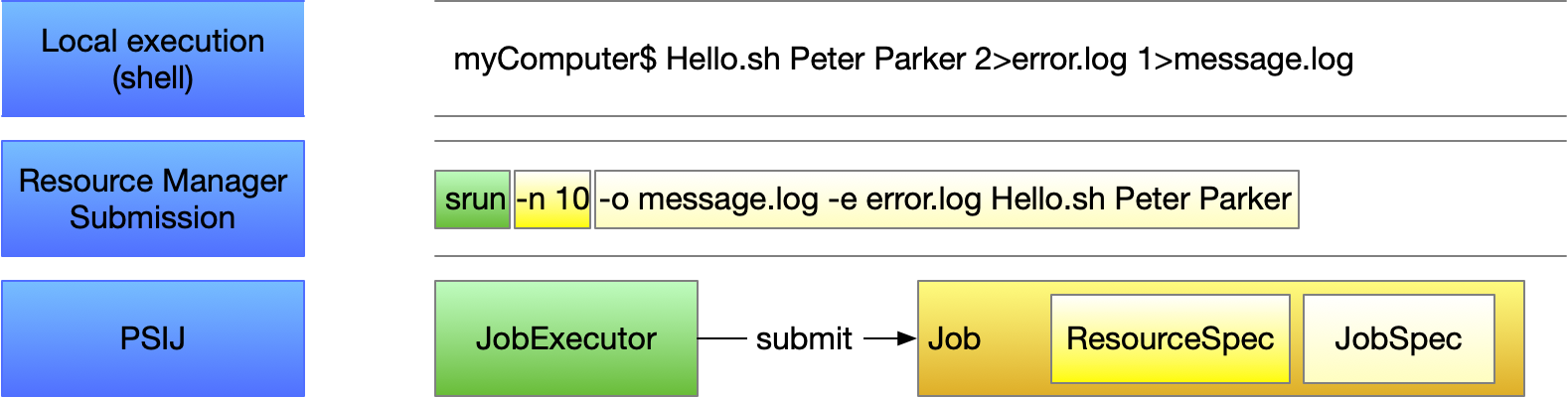
PSI/J currently provides executors for the following backends:
local : run jobs on localhost
flux : Flux Scheduling Framework
slurm : Slurm Scheduling System
lsf : IBM Spectrum LSF
pbspro: Altair’s PBS-Professional
cobalt: ALCF’s Cobalt job scheduler
We encourage the contribution of executors for additional backends—please reference the developer documentation for details.
Submit a Job
The most basic way to use PSI/J looks something like the following:
Create a
JobExecutorinstance.Create a
JobSpecobject and populate it with information about your job.Create a
Jobwith thatJobSpec.Submit the
Jobinstance to theJobExecutor.
On a Slurm cluster, this code might look like:
Slurm // Local // LSF // PBS // Cobalt
ex = JobExecutor.get_instance(execparams.executor)
job = Job(JobSpec(executable='/bin/date', arguments=['-utc', '--debug']))
ex.submit(job)
And by way of comparison, other backends can be selected with the tabs above.
Note that the only difference is the argument to the get_instance method.
The JobExecutor implementation will translate all PSI/J API activities into the
respective backend commands and run them on the backend, while at the same time
monitoring the backend jobs for failure, completion or other state updates.
Assuming there are no errors, you should see a new entry in your resource manager’s queue after running the example above.
Multiple Jobs
In the last section we submitted a single job. Submitting multiple jobs is as simple as adding a loop:
Slurm // Local // LSF // PBS // Cobalt
ex = JobExecutor.get_instance(execparams.executor)
for _ in range(10):
    job = Job(JobSpec(executable="/bin/date"))
    ex.submit(job)
Every JobExecutor can handle arbitrary
numbers of jobs (tested with up to 64k jobs).
Configuring Your Job
In the example above, the executable='/bin/date' part tells PSI/J that we want
the job to run the /bin/date command. But there are other parts to the job
which can be configured:
Arguments for the job executable
Environment the job is running in
Destination for standard output and error streams
Resource requirements for the job’s execution
Accounting details to be used
That information is encoded in the JobSpec which is used to create the
Job instance.
Job Arguments
The executable’s command line arguments to be used for a job are specified as
a list of strings in the arguments attribute of the JobSpec class. For
example, our previous /bin/date job could be changed to request UTC time
formatting:
Slurm // Local // LSF // PBS // Cobalt
ex = JobExecutor.get_instance(execparams.executor)
job = Job(JobSpec(executable='/bin/date', arguments=['-utc', '--debug']))
ex.submit(job)
Note: JobSpec attributes can also be added incrementally:
from psij import JobSpec

spec = JobSpec()
spec.executable = '/bin/date'
spec.arguments = ['-u']
Job Environment
The job environment sets the environment variables for a job before it is
launched. This is the equivalent of exporting FOO=bar on the command line
before running a command. These environment variables are specified as
a dictionary of string key/value pairs:
from psij import JobSpec

spec = JobSpec()
spec.executable = '/bin/date'
spec.environment = {'TZ': 'America/Los_Angeles'}
Environment variables specified this way will overwrite settings from your shell initialization files (e.g., ~/.bashrc), including from any modules loaded in the default shell environment.
Job Stdio
Standard output and standard error streams of the job can be individually
redirected to files by setting the stdout_path and stderr_path attributes:
from psij import JobSpec

spec = JobSpec()
spec.executable = '/bin/date'
spec.stdout_path = '/tmp/date.out'
spec.stderr_path = '/tmp/date.err'
A job’s standard input stream can also be redirected to read from a file by
setting the spec.stdin_path attribute.
Job Resources
A job submitted to a cluster is allocated a specific set of resources to run on.
The number and type of resources are defined by a resource specification,
ResourceSpec, which becomes part of the job specification. The resource
specification supports the following attributes:
node_count: Allocate that number of compute nodes to the job. All cpu-cores and gpu-cores on the allocated node can be exclusively used by the submitted job.
processes_per_node: On the allocated nodes, execute that given number of processes.
process_count: The total number of processes (MPI ranks) to be started.
cpu_cores_per_process: The number of cpu cores allocated to each launched process. PSI/J uses the system definition of a cpu core, which may refer to a physical cpu core or to a virtual cpu core (also known as a hardware thread).
gpu_cores_per_process: The number of gpu cores allocated to each launched process. The system definition of a gpu core is used, but usually refers to a full physical GPU.
exclusive_node_use: When this boolean flag is set toTrue, then PSI/J will ensure that no other jobs, neither from the same user nor from other users of the same system, will run on any of the compute nodes on which processes for this job are launched.
A resource specification does not need to define all available attributes. In fact, an empty resource spec is valid as it refers to a single process being launched on a single cpu core.
The user should also take care not to define contradictory statements. For
example, the following specification cannot be enacted by PSI/J as the specified
node count contradicts the value of process_count / processes_per_node:
from psij import JobSpec, ResourceSpec

spec = JobSpec()
spec.executable = '/bin/stress'
spec.resource_spec = ResourceSpec(node_count=2, processes_per_node=2,
        process_count=2)
# the line above should raise an 'psij.InvalidJobException' exception
Processes Versus Ranks
All processes of a job will share a single MPI communicator
(MPI_COMM_WORLD), independent of their placement, and the term rank (which
usually refers to an MPI rank) is thus equivalent. However, jobs started with
a single process instance may, depending on the executor implementation, not get
an MPI communicator. How jobs are launched can be specified by the launcher
attribute of the JobSpec, as documented below.
Launching Methods
To specify how the processes in your job should be started once resources have been
allocated for it, pass the name of a launcher (e.g. "mpirun", "srun", etc.)
like so: JobSpec(..., launcher='srun').
Scheduling Information
To specify resource manager-specific information, like queues/partitions,
runtime, and so on, create a JobAttributes and set it with JobSpec(...,
attributes=my_job_attributes):
Slurm // Local // LSF // PBS // Cobalt
executor = JobExecutor.get_instance(execparams.executor)

job = Job(
    JobSpec(
        executable="/bin/date",
        resources=ResourceSpecV1(node_count=1),
        # attributes=JobAttributes(
        #     queue_name="<QUEUE_NAME>",
        #     project_name="<ALLOCATION>"
        # ),
    )
)

executor.submit(job)
The <QUEUE_NAME> and <ALLOCATION> fields will depend on the system you are running on.
Managing Job State
In all the above examples, we have submitted jobs without checking on what
happened to them. Once the job has finished executing (which, for /bin/date,
should be almost as soon as the job starts) the resource manager will mark the
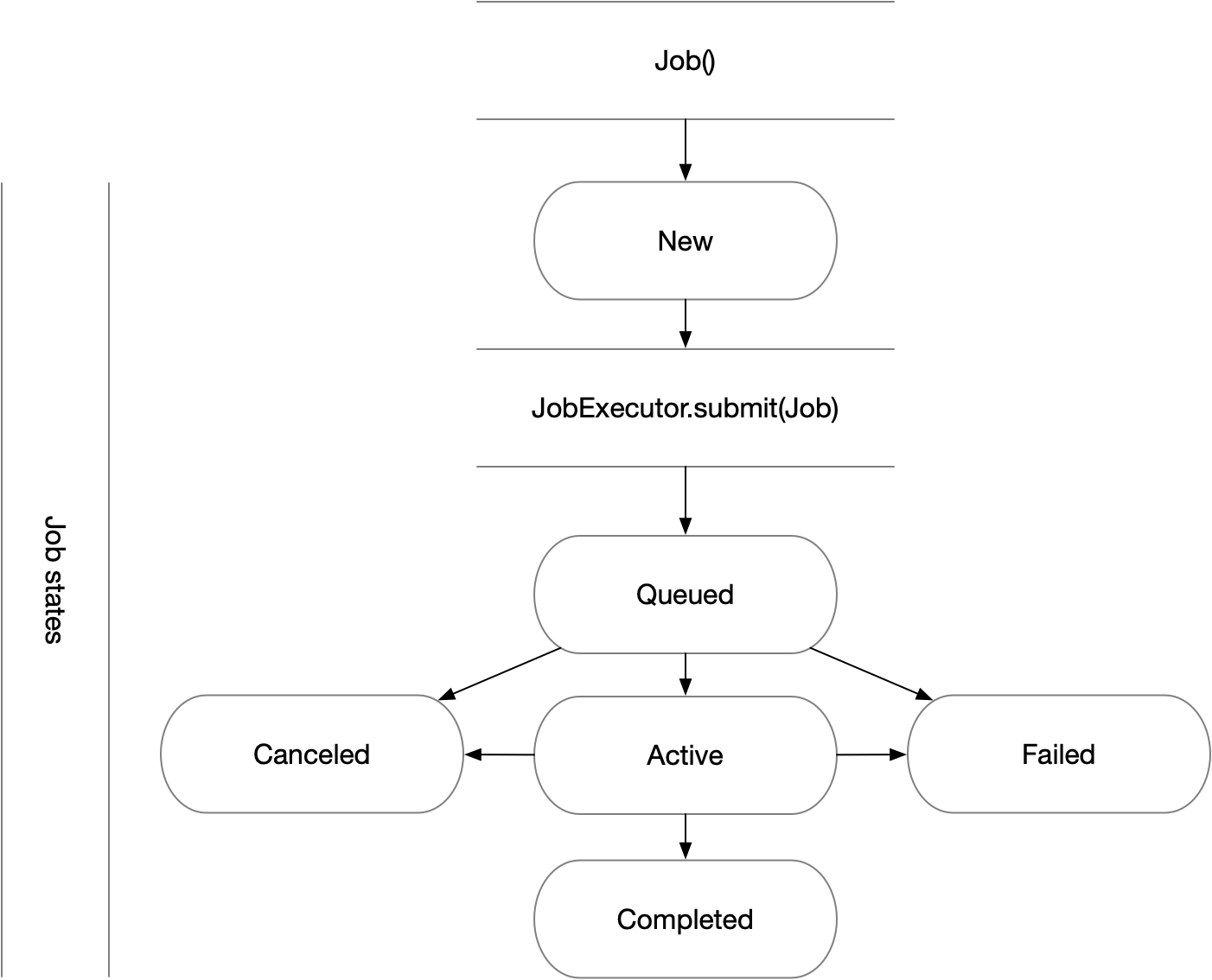
job as complete, triggering PSI/J to do the same via the JobStatus attribute of the job. Job state
progressions follow this state model:
Waiting for Completion
To wait for a job to complete once it has been submitted, it suffices
to call the wait method with no arguments:
from psij import Job, JobSpec

job = Job(JobSpec(executable="/bin/date"))
ex.submit(job)
job.wait()
The wait call will return once the job has reached
a terminal state, which almost always means that it finished or was
canceled.
To distinguish jobs that complete successfully from ones that fail or
are canceled, fetch the status of the job after calling
wait:
job.wait()
print(str(job.status))
Canceling Your Job
If supported by the underlying job scheduler, PSI/J jobs can be canceled by
invoking the cancel method.
Status Callbacks
Waiting for jobs to complete with wait is fine if
you don’t mind blocking while you wait for a single job to complete. However, if
you want to wait on multiple jobs without blocking or you want to get updates
when jobs start running, you can attach a callback to a JobExecutor which will fire whenever any job submitted to
that executor changes status.
To wait on multiple jobs at once:
Slurm // Local // LSF // PBS // Cobalt
count = 10
def callback(job: Job, status: JobStatus) -> None:
    global count

    if status.final:
        print(f"Job {job} completed with status {status}")
        count -= 1

ex = JobExecutor.get_instance(execparams.executor)
ex.set_job_status_callback(callback)

for _ in range(count):
    job = Job(JobSpec(executable="/bin/date"))
    ex.submit(job)

while count > 0:
    time.sleep(0.01)
Status callbacks can also be set on individual jobs with
set_job_status_callback.